Star Leap — Jump & Landing Effects (Galaxy Crater)
상품 설명
이 상품에는 AI로 생성된 콘텐츠가 포함되어 있습니다.
▶ VRChat avatar effect · PC only · needs Modular Avatar (free, from VCC) · drag-and-drop prefab
Not made for one avatar: Modular Avatar hooks it to your avatar's own hips at upload, so it works on humanoid avatars in general. Checked in Unity on the VRChat SDK sample avatar.
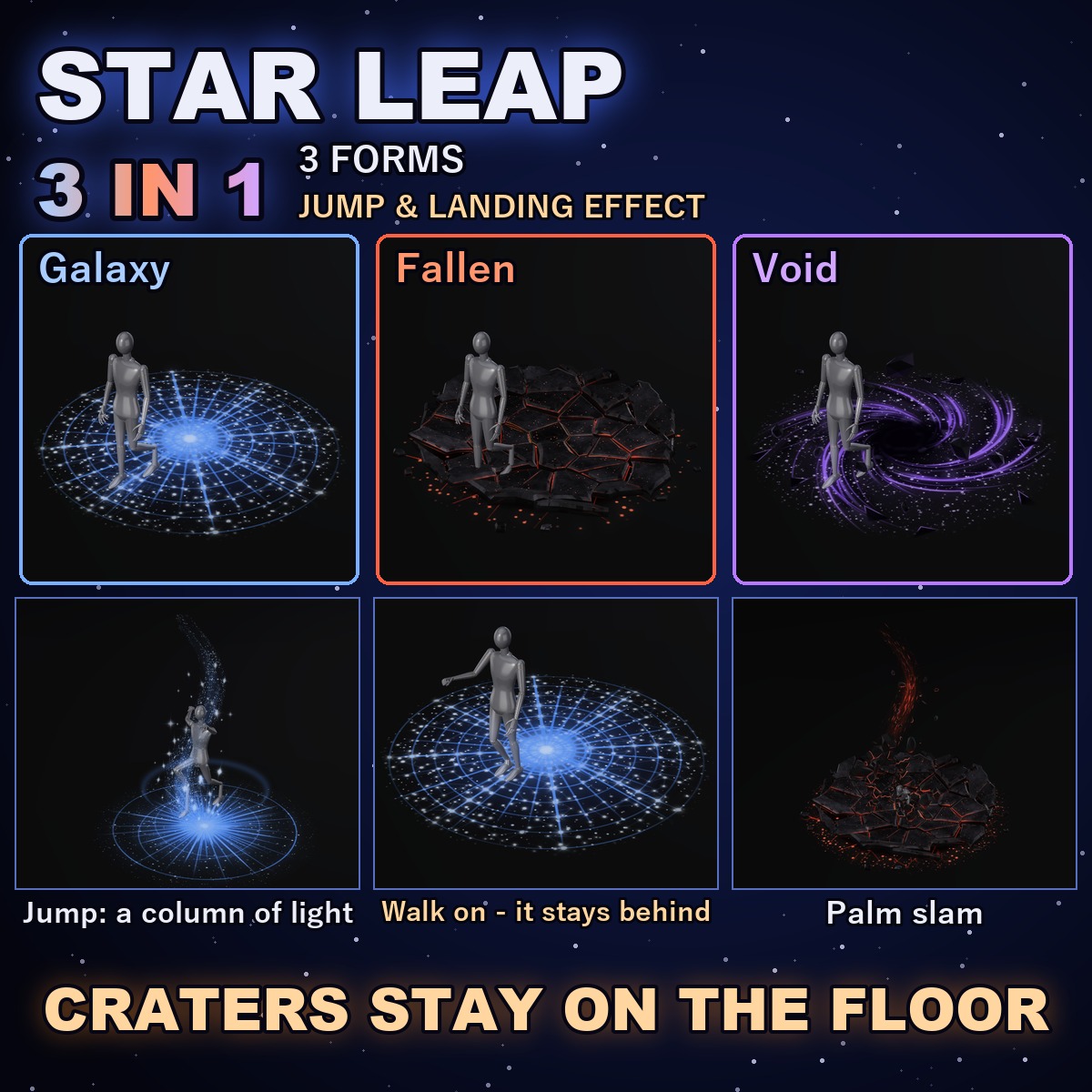
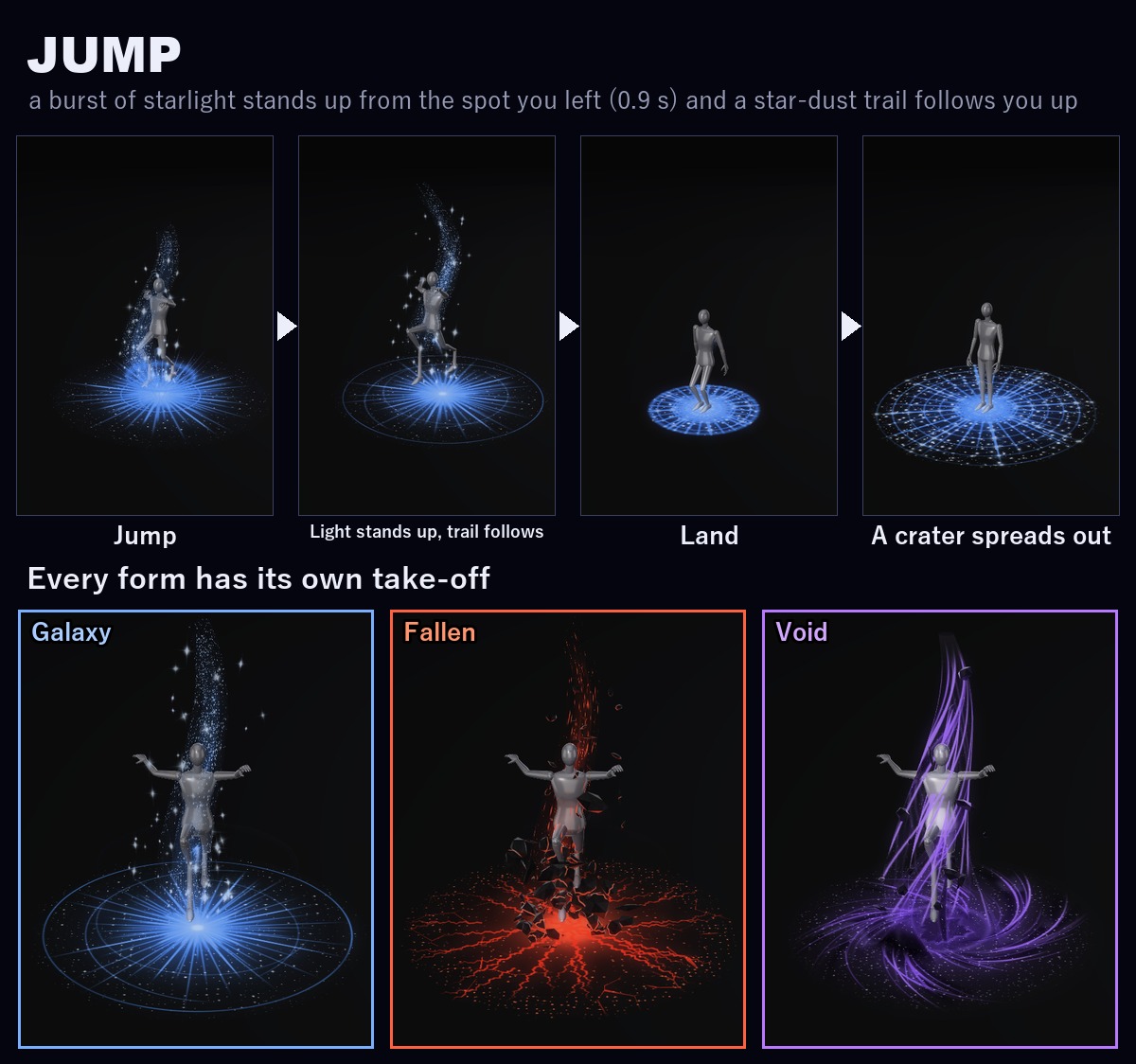
Your jumps leave the floor glowing. Jump and a burst of starlight stands up from the spot you left, while a streak of star dust follows you into the air. Land and a star-chart crater spreads across the floor where you came down, then slowly breaks up into scattered stars. Both stay on the spot as you walk away, like real marks on the ground. Crouch first to charge the next one, or slam a palm on the floor to set one off right where you are.
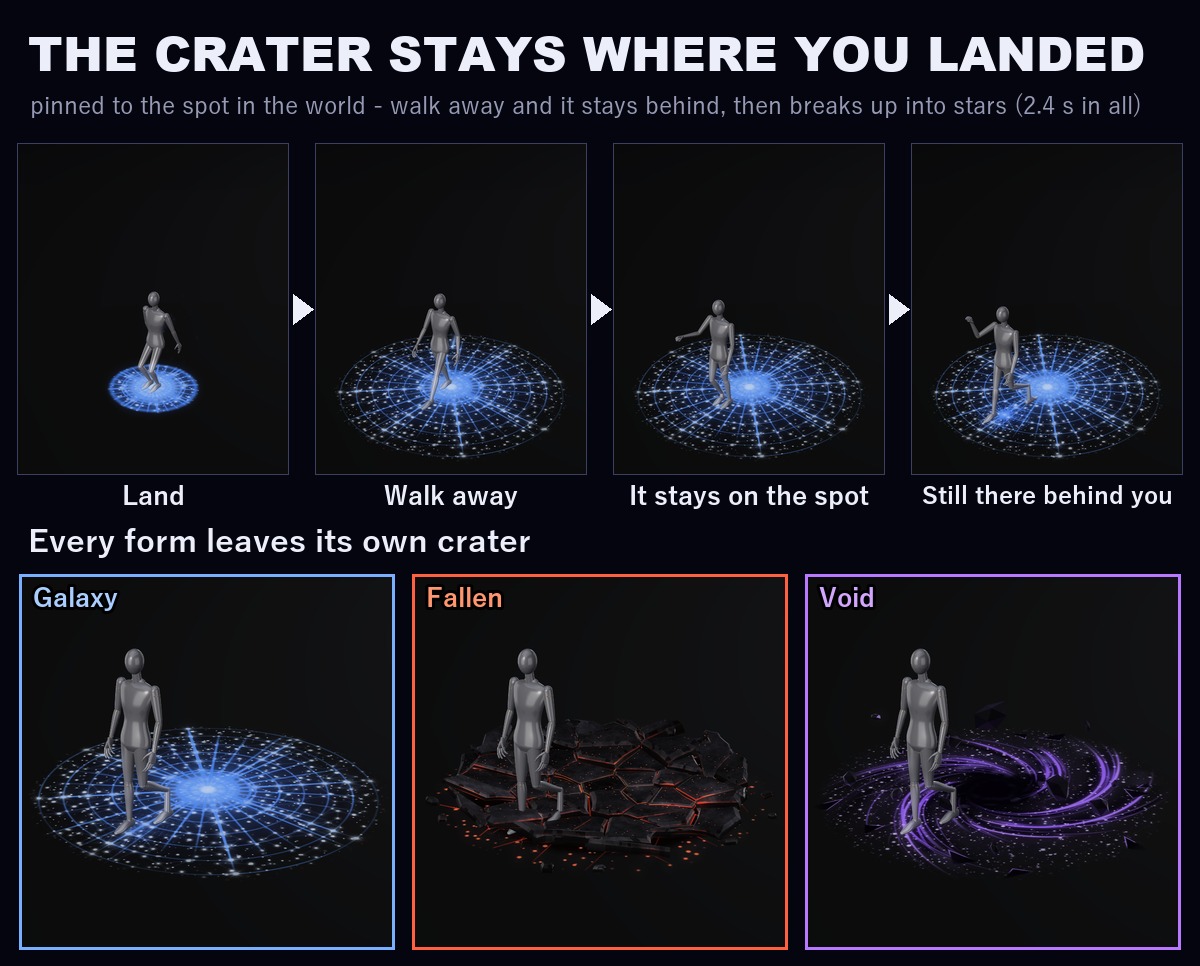
THE MARKS STAY WHERE THEY HAPPENED
The take-off burst and the landing crater are pinned to the place in the world where they started, so they never slide along with you. Walk off and they stay behind you on the floor.
WHAT IT DOES
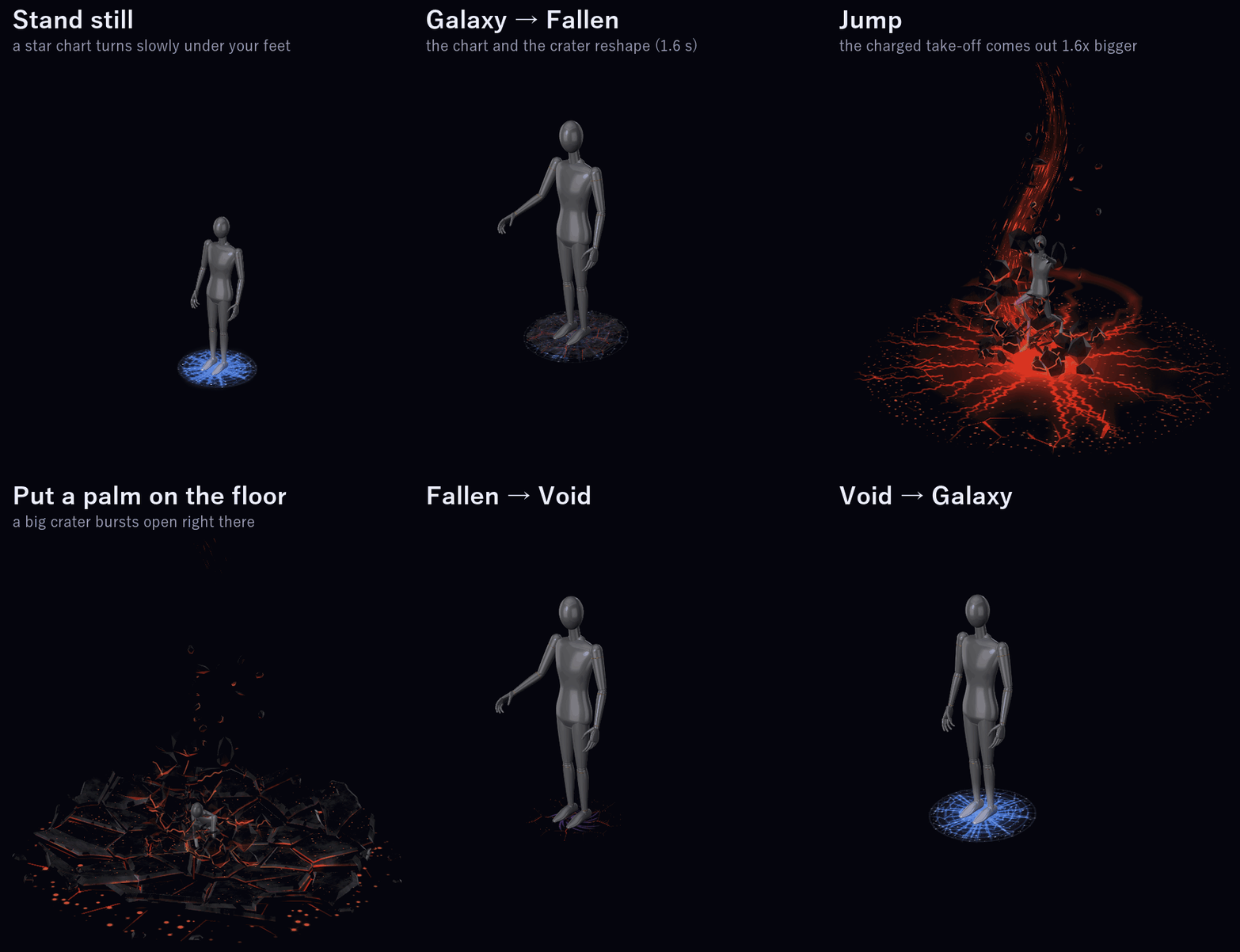
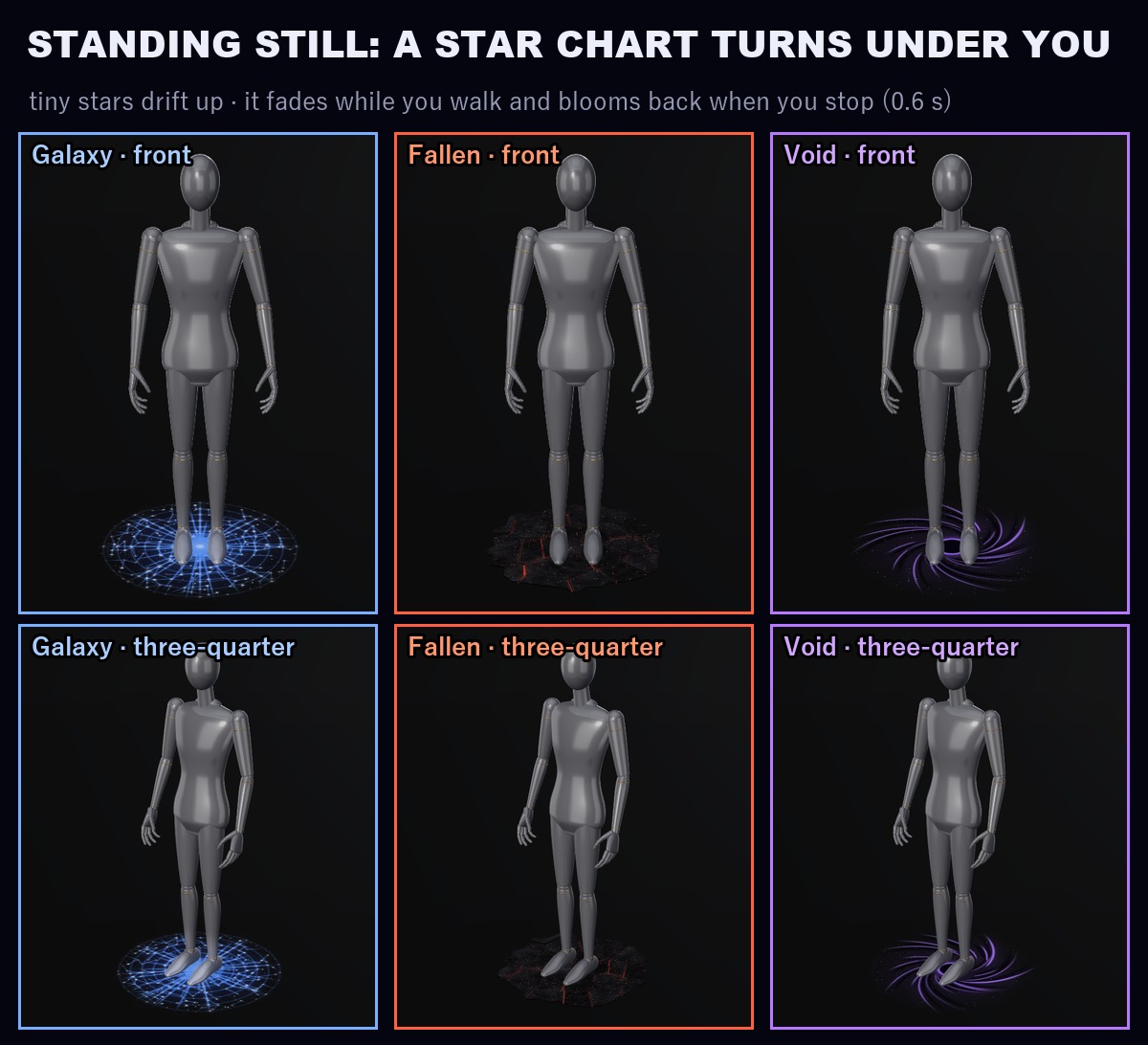
• Standing still: a faint star chart lies under your feet and turns slowly, with tiny stars drifting up. It fades while you walk and blooms back when you stop (0.6 s).
• Jump: a starlight burst stands up from the spot you took off from (0.9 s), and a star-dust trail follows your hips up.
• Land: after a real jump (0.15 s or more in the air), a crater spreads across the floor where you land (0.5 s) and fades into scattered stars (2.4 s in all). Jump again before it is gone and the old one fades out in 0.3 s.
• Stepping off a ledge or walking over bumps doesn't set it off: a jump needs your feet to leave the ground moving upward.
TWO BODY MOVES
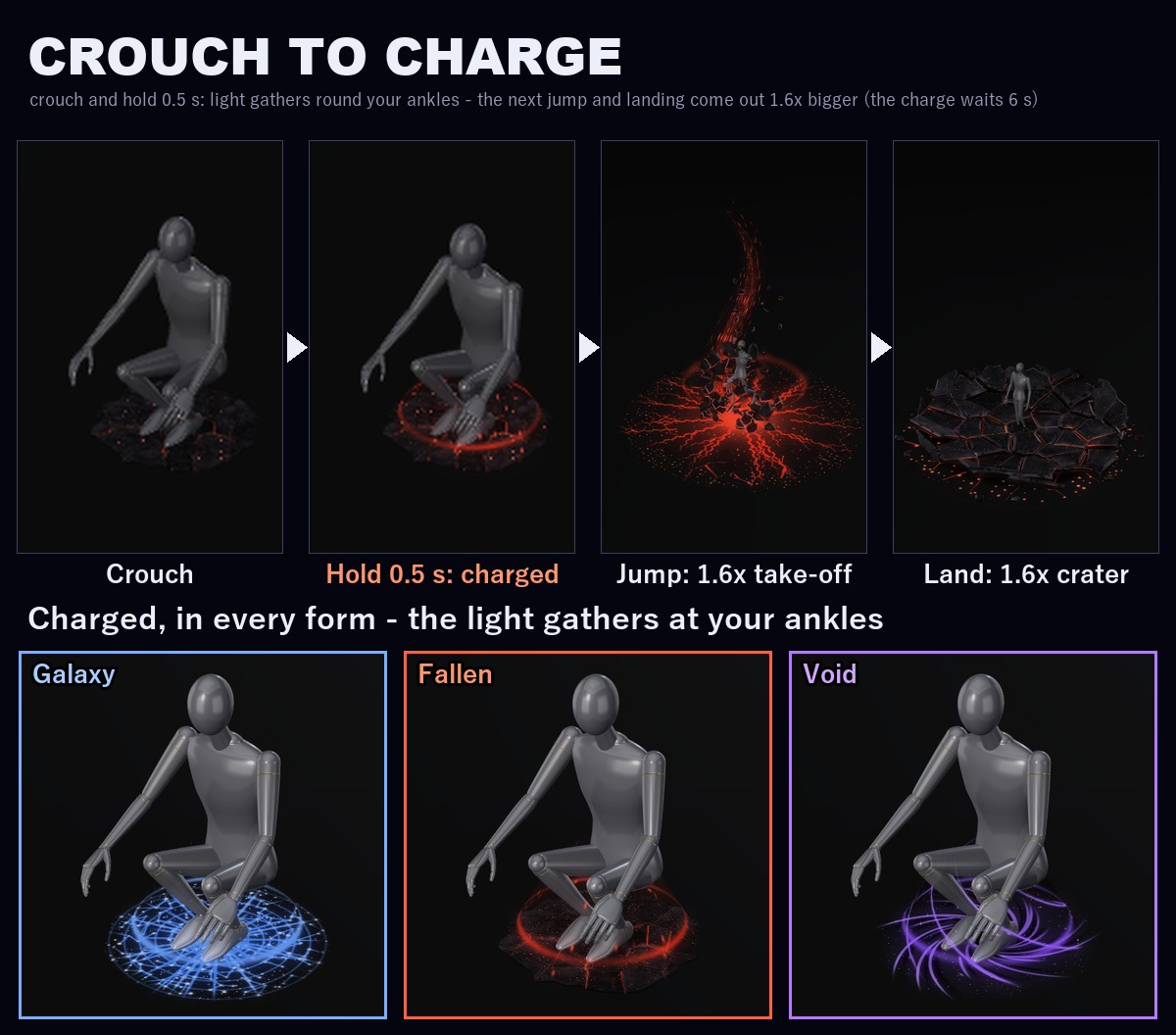
• Crouch and hold it 0.5 s: star light gathers up around your ankles and the chart under you brightens. Your next jump and landing come out 1.6× bigger. The charge waits 6 s after you stand up.
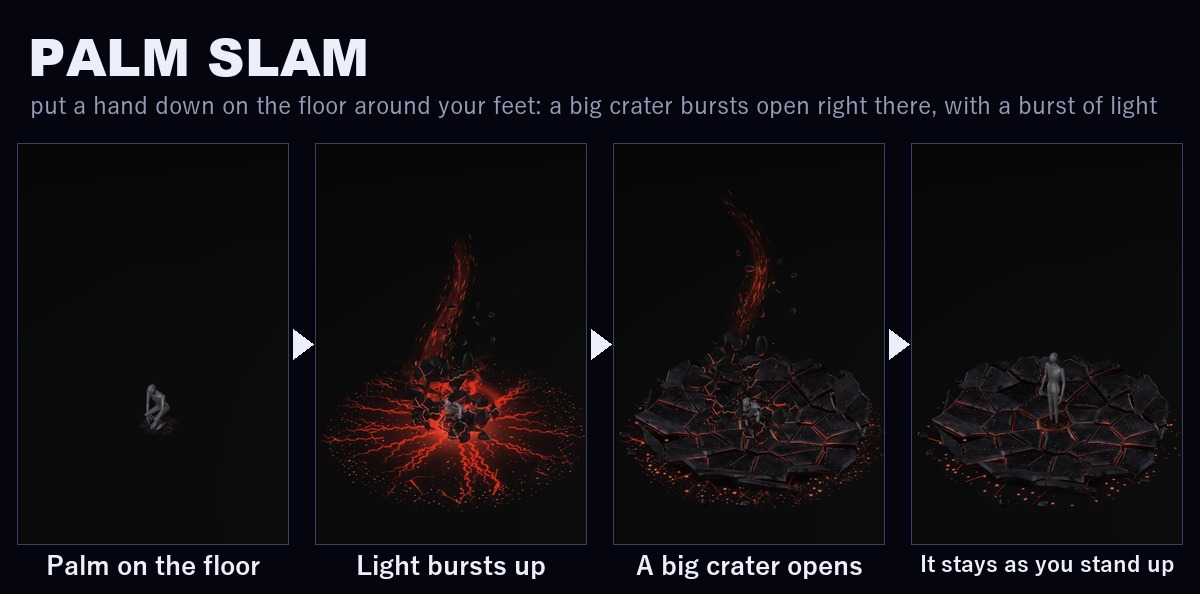
• Palm slam: put a hand down on the floor around your feet and a big crater bursts open right there, with a burst of light.
CHANGE FORM WITH ONE HAND SIGN (works while you walk)
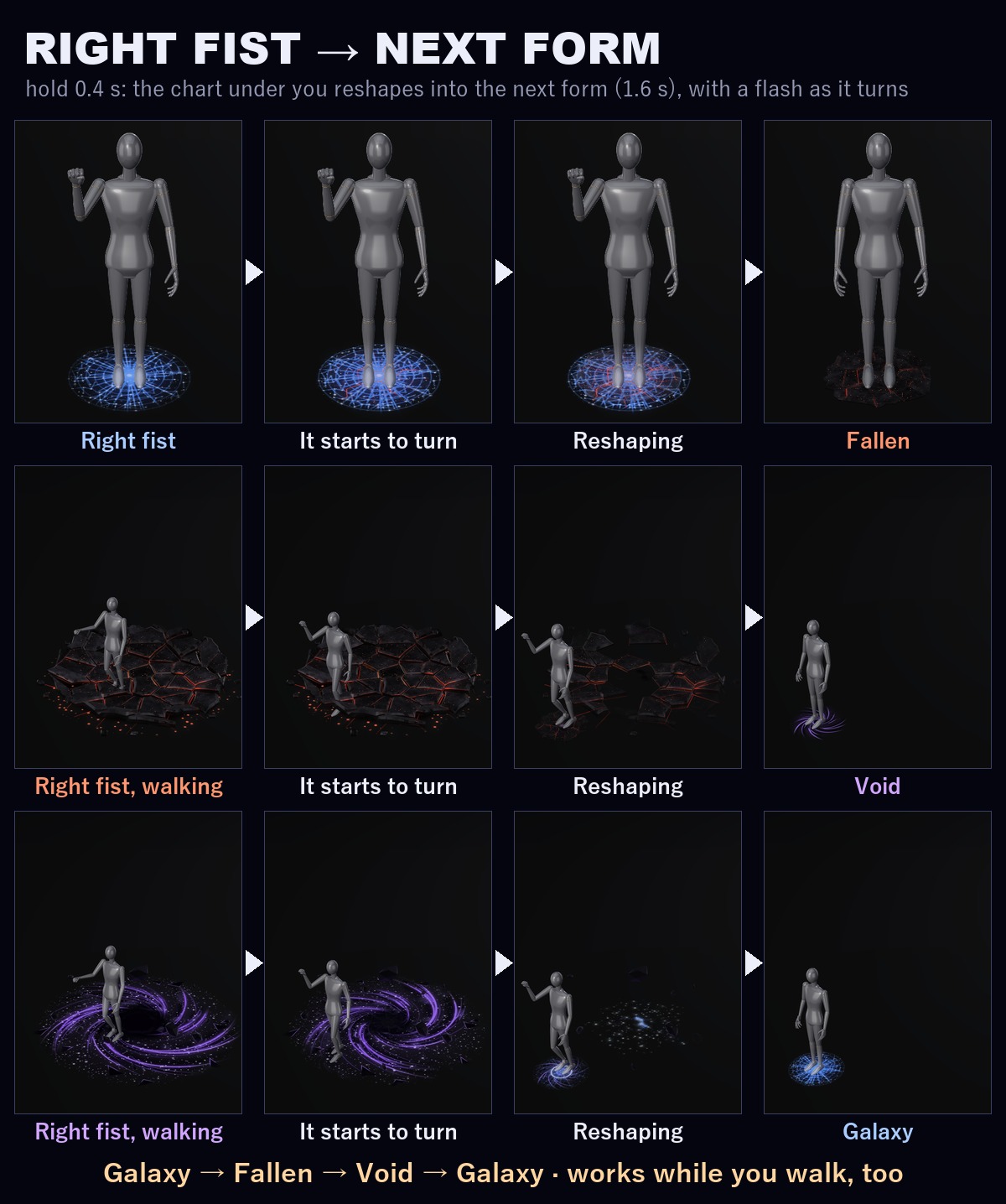
Right fist, held 0.4 s: the star chart under you reshapes into the next form over 1.6 s, with a flash as it turns. Galaxy → Fallen → Void → Galaxy.
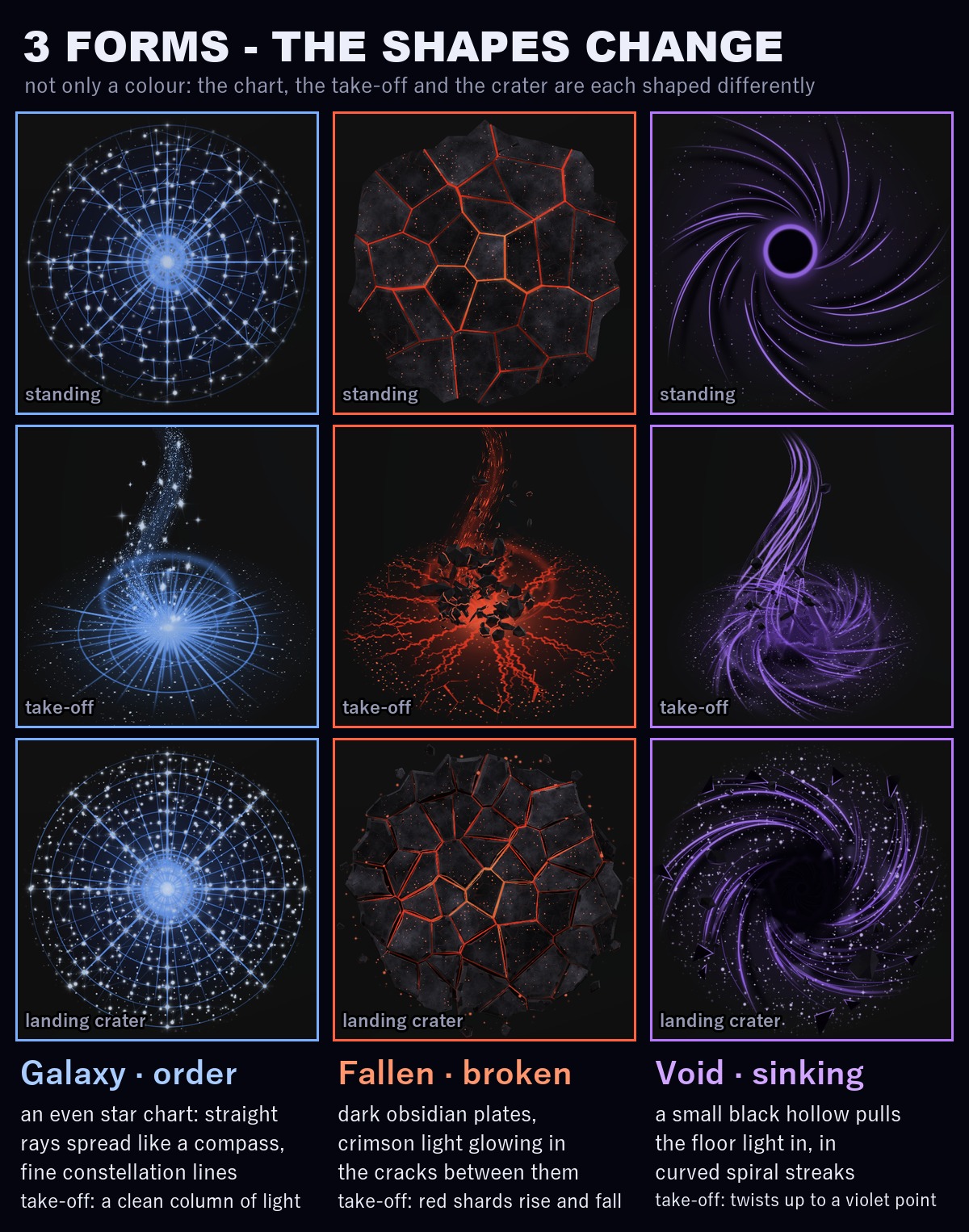
3 FORMS (the shapes change, not only the colour)
• Galaxy (order): an even star chart — rings around a bright core, straight rays spread like a compass, a net of fine constellation lines and stars, a calm blue glow. The take-off is a tall, curving plume of star dust with cross-shaped glints.
• Fallen (broken): the floor breaks into thick, dark stone slabs with red-hot light in the gaps between them; the slabs at the rim are left tilted up, with embers scattered around the edge. The take-off throws dark obsidian shards up through a stream of red embers, and red cracks run out across the floor.
• Void (sinking): a black hole opens in the floor and the light is pulled into it in spiral streaks, with black chunks floating over it. The take-off twists up in a tall bundle of violet ribbons with black shards caught in them.
MENU ("Star Leap")
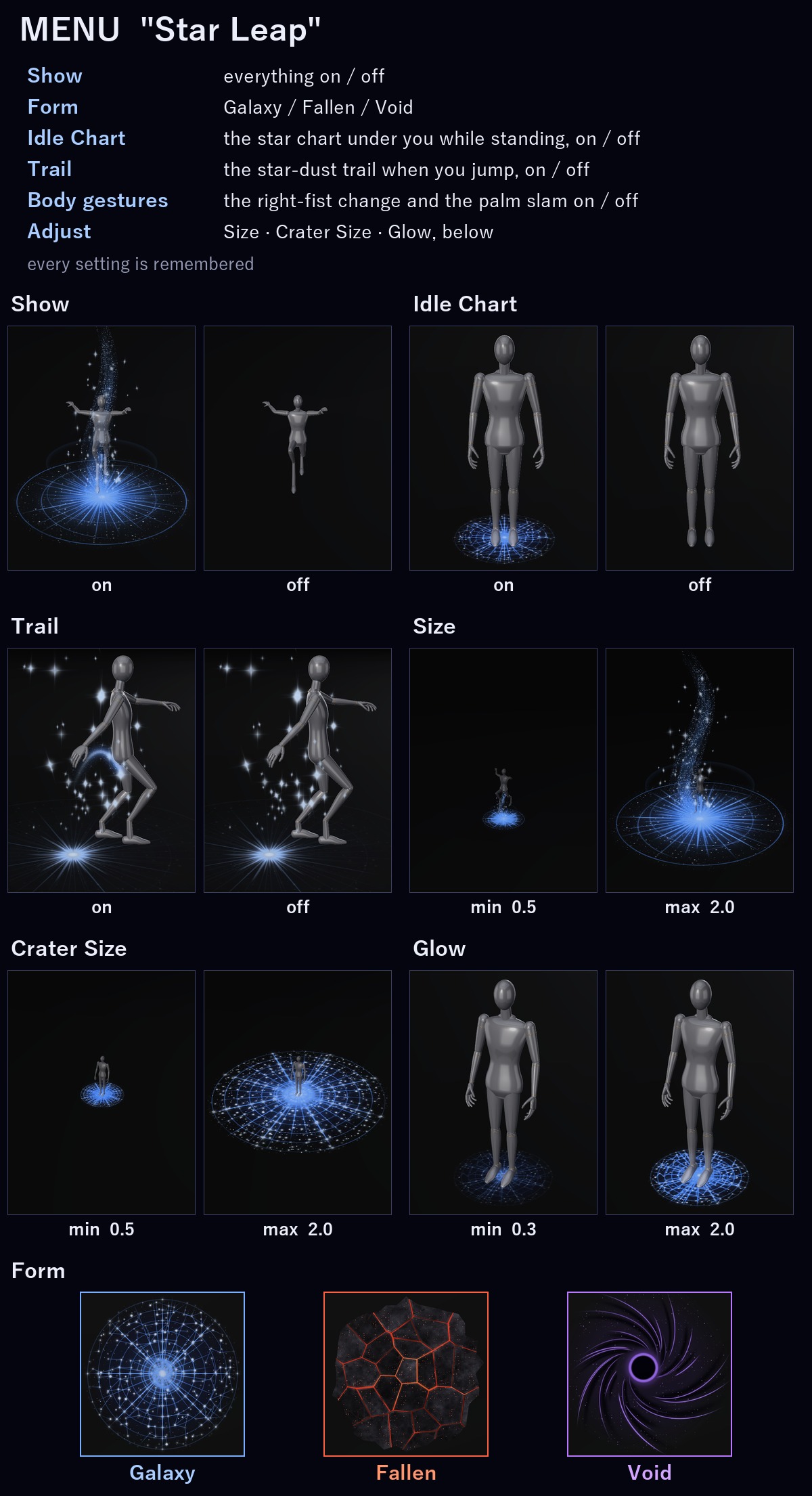
• Show: everything on / off (on to start, remembered)
• Form: Galaxy / Fallen / Void (remembered)
• Idle Chart: the star chart under your feet while standing, on / off (on to start, remembered)
• Trail: the star-dust trail when you jump, on / off (on to start, remembered)
• Body gestures: the right-fist change and the palm slam on / off (on to start, remembered). Turn it off if you use those moves a lot.
• Adjust (all remembered): Size 0.5 – 2.0 · Crater Size 0.5 – 2.0 · Glow 0.3 – 2.0
TWO PREFABS, SAME MENU AND MOVES
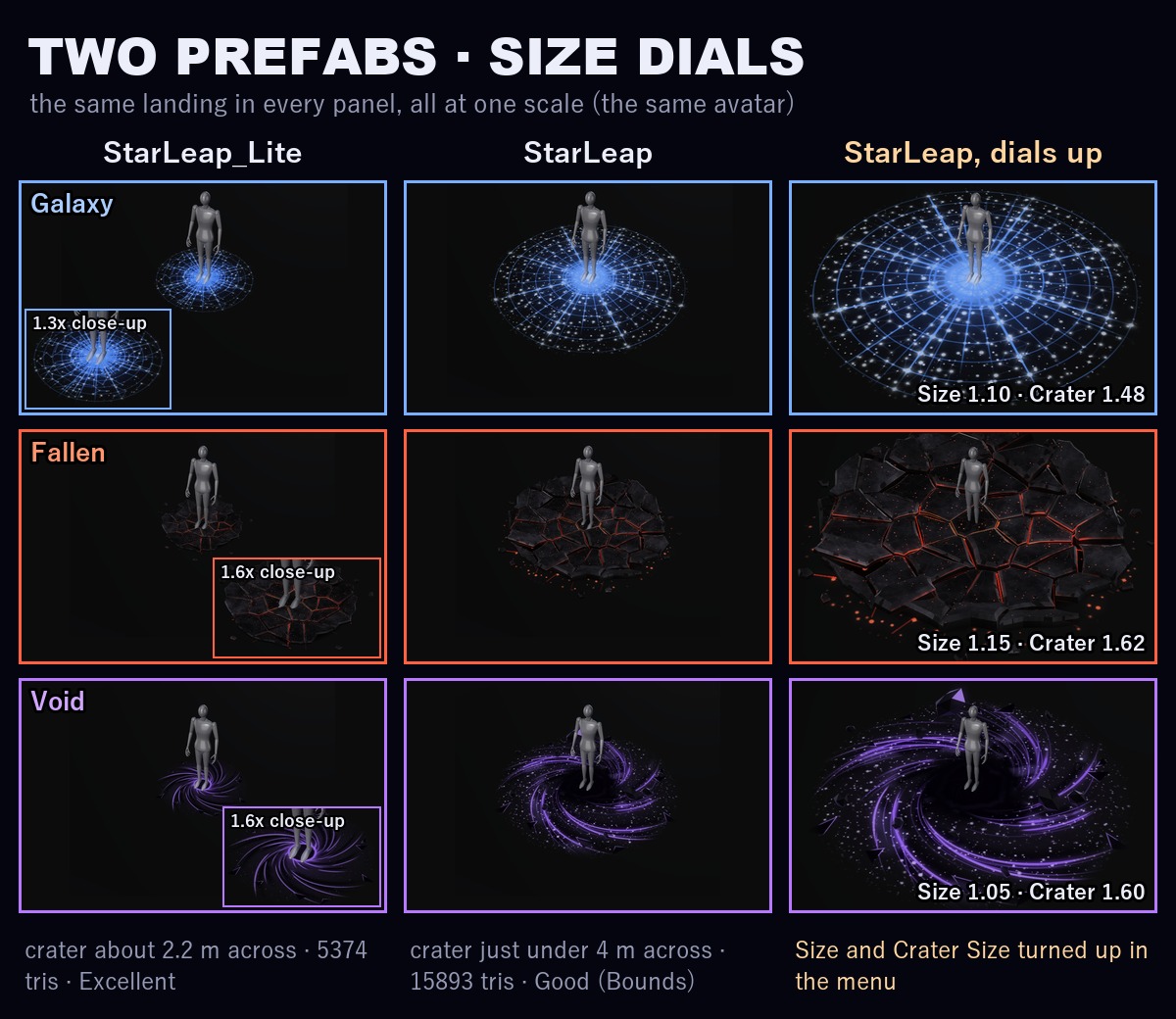
• StarLeap: full size — the crater it leaves is just under 4 m across.
• StarLeap_Lite: a smaller, lighter version (the crater about 2.2 m across, 5,374 tris) for busy instances.
PERFORMANCE (VRChat PC rank, measured with the VRChat SDK)
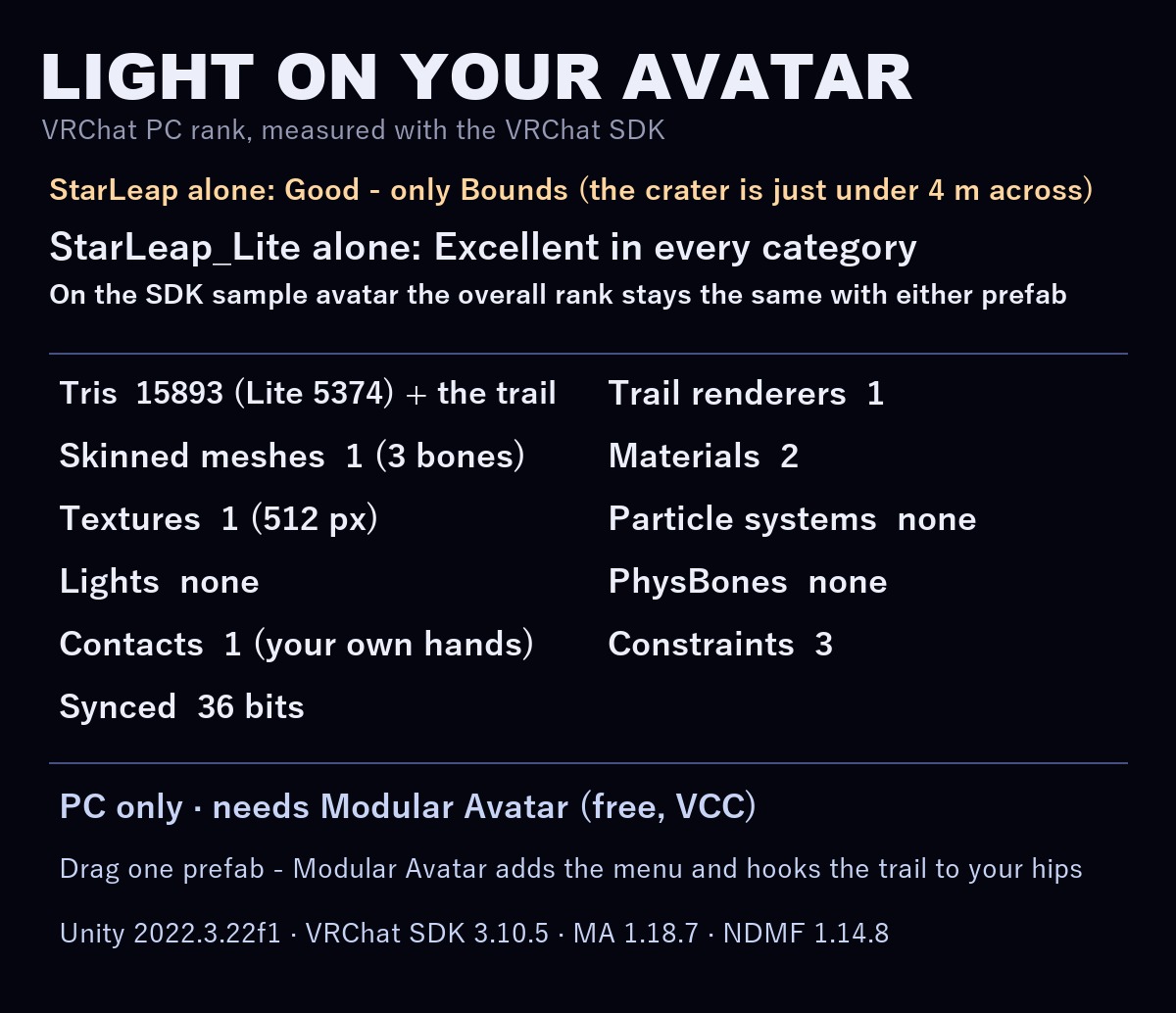
StarLeap (Full) on its own: Good. Only Bounds is Good (the crater it leaves is just under 4 m across); every other category is Excellent.
StarLeap_Lite on its own: Excellent in every category.
On the SDK sample avatar (Medium on its own): the overall rank stays Medium with either prefab. Full moves Bounds, Skinned Meshes and Material Slots from Excellent to Good; Lite moves only Skinned Meshes and Material Slots (each adds 1 skinned mesh and 2 materials).
No particle systems, no lights, no PhysBones: one mesh drawn by its own shader, and one trail.
EASY TO PUT ON
Drag one prefab onto your avatar and upload. Modular Avatar adds the "Star Leap" menu, the parameters and the animator layers for you, and hooks the trail to your hips.
It is sized for the VRChat SDK sample avatar. For a much smaller or bigger avatar, use the Size and Crater Size dials.
WHAT'S INCLUDED
• SL_1.1.0.unitypackage: 2 prefabs (StarLeap and StarLeap_Lite), 2 shaders, 2 materials, 2 meshes, 1 texture, menu and animator
Folder: Assets/Caligo/Star Leap/
• README (English and Japanese)
SPECS
• Tris: 15,893 (StarLeap_Lite: 5,374) + the trail
• Skinned meshes: 1 (3 bones) / Materials: 2 / Textures: 1 / Lights: none / Particle systems: none / Trail renderers: 1
• PhysBones: none / Contacts: 1 / Constraints: 3 (VRChat constraints)
• Synced parameters: 36 bits
REQUIREMENTS
• Modular Avatar (available through VCC)
TESTED WITH
Unity 2022.3.22f1 / VRChat SDK 3.10.5 / Modular Avatar 1.18.7 / NDMF 1.14.8. The parts, the parameters, the menu and the animator steps are checked in Unity. The package imports into a clean project with no problems.
PC only (the shaped floor marks are drawn by PC shaders; no Quest version).
GOOD TO KNOW
• The hand sign and the palm slam only listen to your own hands; other players can't set them off.
• The marks are flat at the floor height where your feet were, so on stairs or steep slopes they can float or sink a little.
• People who block custom shaders in their Safety settings won't see it.
SUPPORT
If the jump, the landing crater, the crouch charge, the palm slam, the form change or anything else doesn't work as described in VRChat, message me on Jinxxy. I'll fix it and send you the update for free.
AI DISCLOSURE (AI-Assisted)
The shaders, the animation code and the text on this page were written with help from an AI assistant. An AI image generator made rough concept sketches I looked at while designing (the look follows them); nothing it made is in the files or in the preview images, which are rendered in Unity from the actual effect.
TERMS
• OK to use on your avatar in VRChat and other platforms
• OK to stream, record, and post on social media
• Editing is fine
• Please don't redistribute or resell the files, edited or not
UPDATES
• v1.1.0 (2026-11-24): rebuilt — a taller column and a wider crater in all three forms, the stone slabs, ribbons and star dust redone, and a new StarLeap_Lite prefab
• v1.0.0 (2026-11-22): first release