
SCP-178 3-D Specs: Slide Them Up onto Your Head, Optional Shadow Figures Around You | VRChat Avatar Accessory, Fits 21 Avatars (Modular Avatar), CC BY-SA 3.0
상품 설명
이 상품에는 AI로 생성된 콘텐츠가 포함되어 있습니다.
License: CC BY-SA 3.0 ( https://creativecommons.org/licenses/by-sa/3.0/ ). A fan-made derivative of "SCP-178" by 91stCataclysm from the SCP Wiki. Not an official product, and not affiliated with or endorsed by the SCP Wiki or the original author. Credits and what the license lets you do are right below.
AI-Assisted: the Blender/Python scripts that build the 3D model, textures, animations and sounds, and this English text, were written with an AI coding assistant under Chanmayu Kobo's direction. No generative-AI image, 3D-model or audio tool was used.
License and credits
- License of this product: "SCP-178 3-D Specs" © 2026 Chanmayu Kobo is released under the Creative Commons Attribution-ShareAlike 3.0 Unported License (CC BY-SA 3.0): https://creativecommons.org/licenses/by-sa/3.0/ The license covers all files in the download. These are the license terms specified by the creator for this product (CC BY-SA 3.0). Chanmayu Kobo does not apply the Jinxxy default licenses (JAL / JGAL) to it and adds no terms of its own on top of CC BY-SA 3.0. Jinxxy's Terms of Service apply separately.
- Source: this work is a derivative of "SCP-178" by 91stCataclysm, from the SCP Wiki ( https://scp-wiki.wikidot.com/scp-178 ), which is licensed under CC BY-SA 3.0. Adapted by Chanmayu Kobo.
- Changes from the source: The shape was modeled only from the article's text (white 3-D glasses with a rectangular white cardboard frame, a blue left lens and a red right lens of transparent plastic, cardboard slightly discolored with age); the image on the article page, game models and fan art were not used. The size, the shape of the lens windows, the nose notch, the temple arms and the position on top of the head are original work by Chanmayu Kobo. The "shadow figures" are only a visual effect, soft faceless silhouettes drawn by Chanmayu Kobo that everyone around can see, and they have none of the properties described in the article; the lenses are only colored.
- Not official: this is a fan-made derivative work. It is not affiliated with, sponsored by or endorsed by the SCP Wiki or the original author, and it is not an official product.
- What you may do: This product is licensed to you under CC BY-SA 3.0. You may use it, edit it, share it, redistribute it and sell it, including edited versions. That includes uploading it to VRChat (public avatars too), streams, videos and photos, and commercial use.
- Conditions: When you distribute the work or publicly perform it, as the license defines those words (original or edited; for example a public avatar, handing the data to someone, or a stream or video): (1) give credit in a way that is reasonable for the medium: the title, author and URL of the source article, this product and Chanmayu Kobo, and the license name with its URL; (2) say so if you changed it (for example "Recolored"); (3) keep the copyright, license and disclaimer notices that come with it (see
LICENSE.txt); (4) offer the original under CC BY-SA 3.0, and edited versions under CC BY-SA 3.0 or another license that section 4(b) of the license allows (such as a later version of CC BY-SA); do not add terms or technical locks that take away what the license allows. Edits you keep to yourself do not have to be published. - Credit line you can copy: "SCP-178 3-D Specs" © 2026 Chanmayu Kobo, based on "SCP-178" by 91stCataclysm, from the SCP Wiki (https://scp-wiki.wikidot.com/scp-178). Licensed under CC BY-SA 3.0 (https://creativecommons.org/licenses/by-sa/3.0/).
- Wearing it on your avatar: put the credit line where you reasonably can (for example the avatar description, a sign in your world, or the description of a stream or video). Whether an avatar can be cloned is not the only thing that matters: the credit is required whenever you distribute the work or publicly perform it.
- Modular Avatar and lilToon are not included. They have their own licenses.
- No warranty: The license's disclaimer of warranties and limitation of liability apply (sections 5 and 6 of the legal code).
- The license notice is in
LICENSE.txtin the download. Legal code: https://creativecommons.org/licenses/by-sa/3.0/legalcode (if this page and the legal code differ, the legal code prevails).
Description
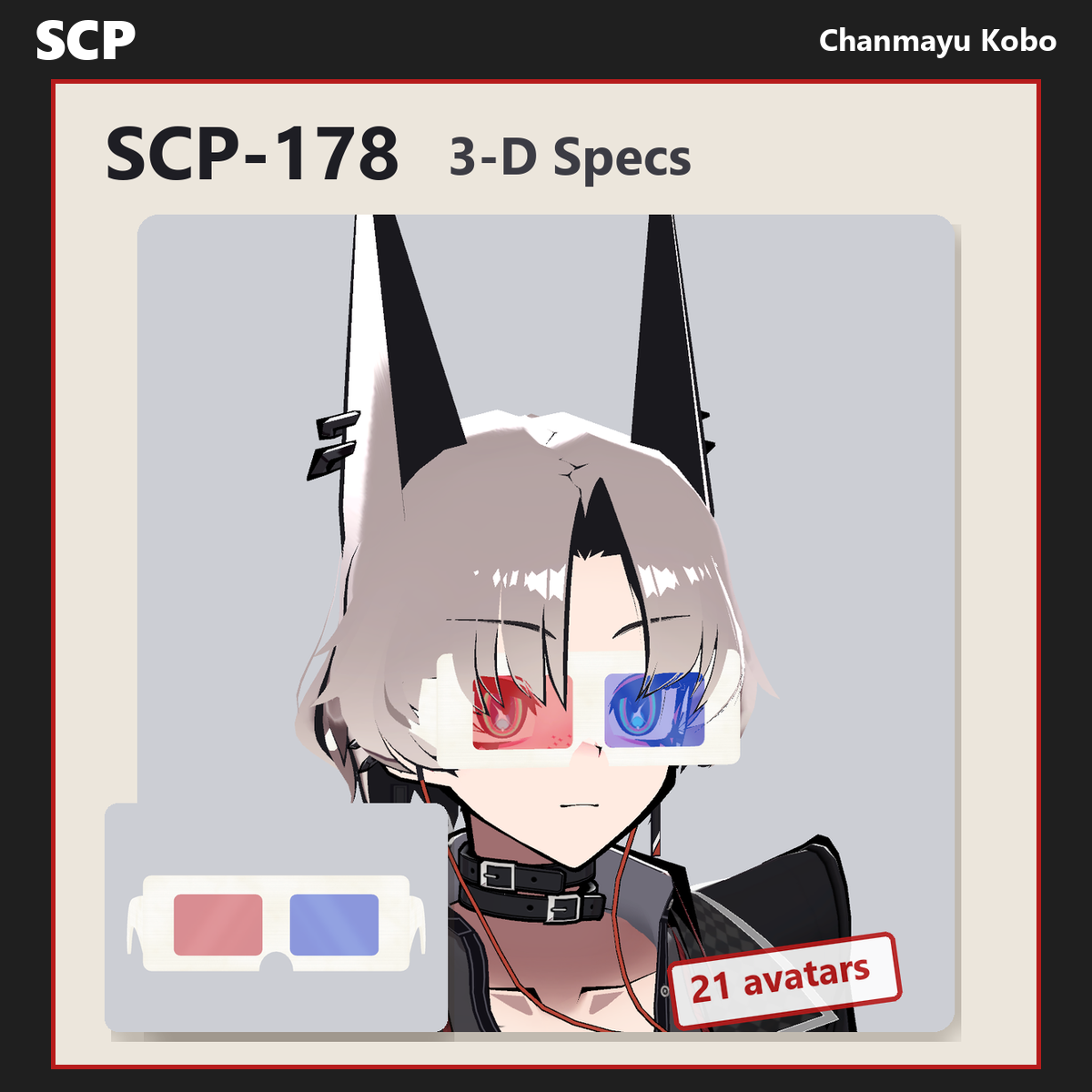
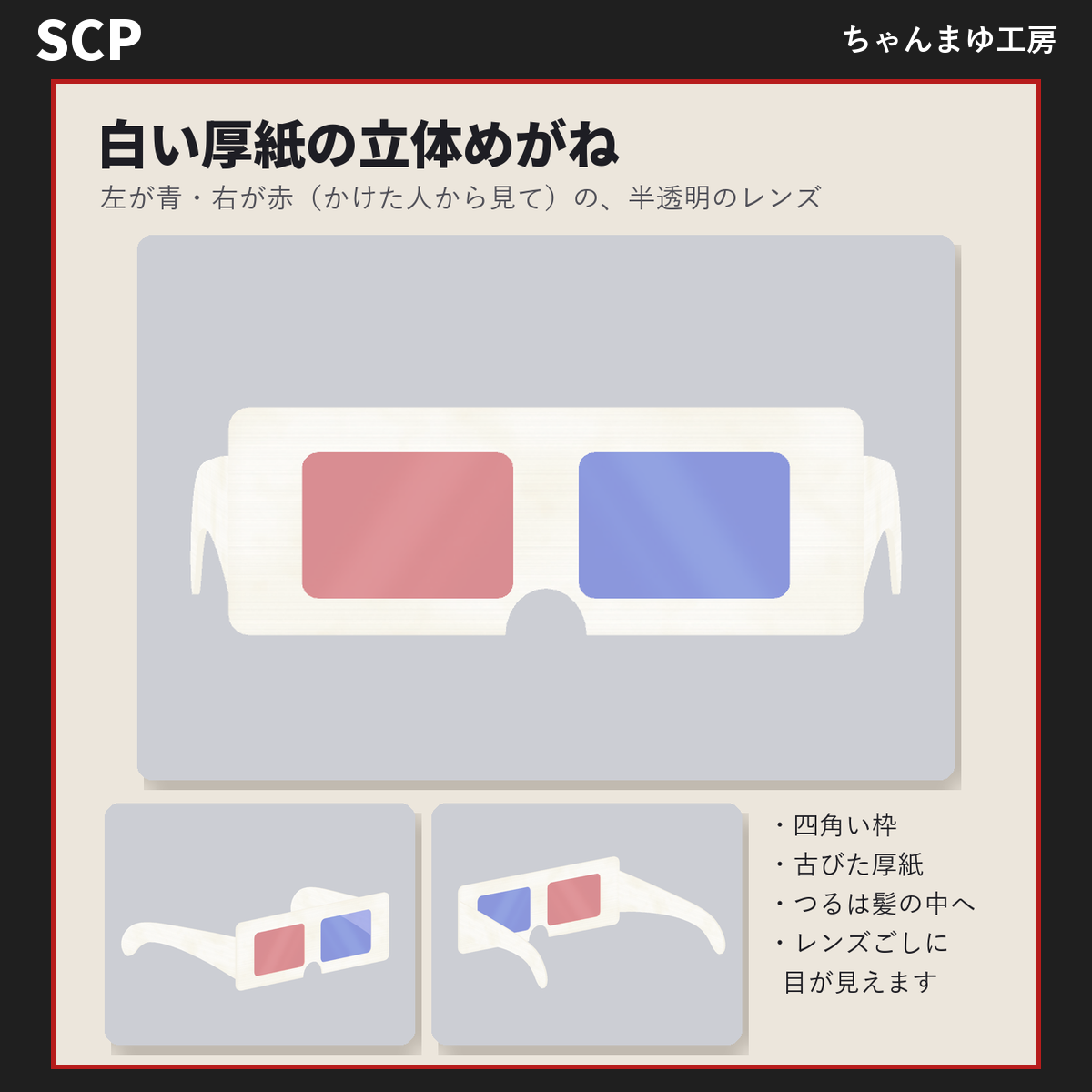
A pair of old-fashioned paper 3-D glasses: a rectangular white cardboard frame, slightly yellowed with age, with one blue and one red see-through lens. This is SCP-178 as an accessory for your avatar's face. Slide them up onto your forehead from the menu, or turn on "Shadow figures" and tall, hazy silhouettes stand around you while the glasses are on your face.
Highlights
- White cardboard frame with semi-transparent blue and red lenses; your avatar's eyes show through the lenses
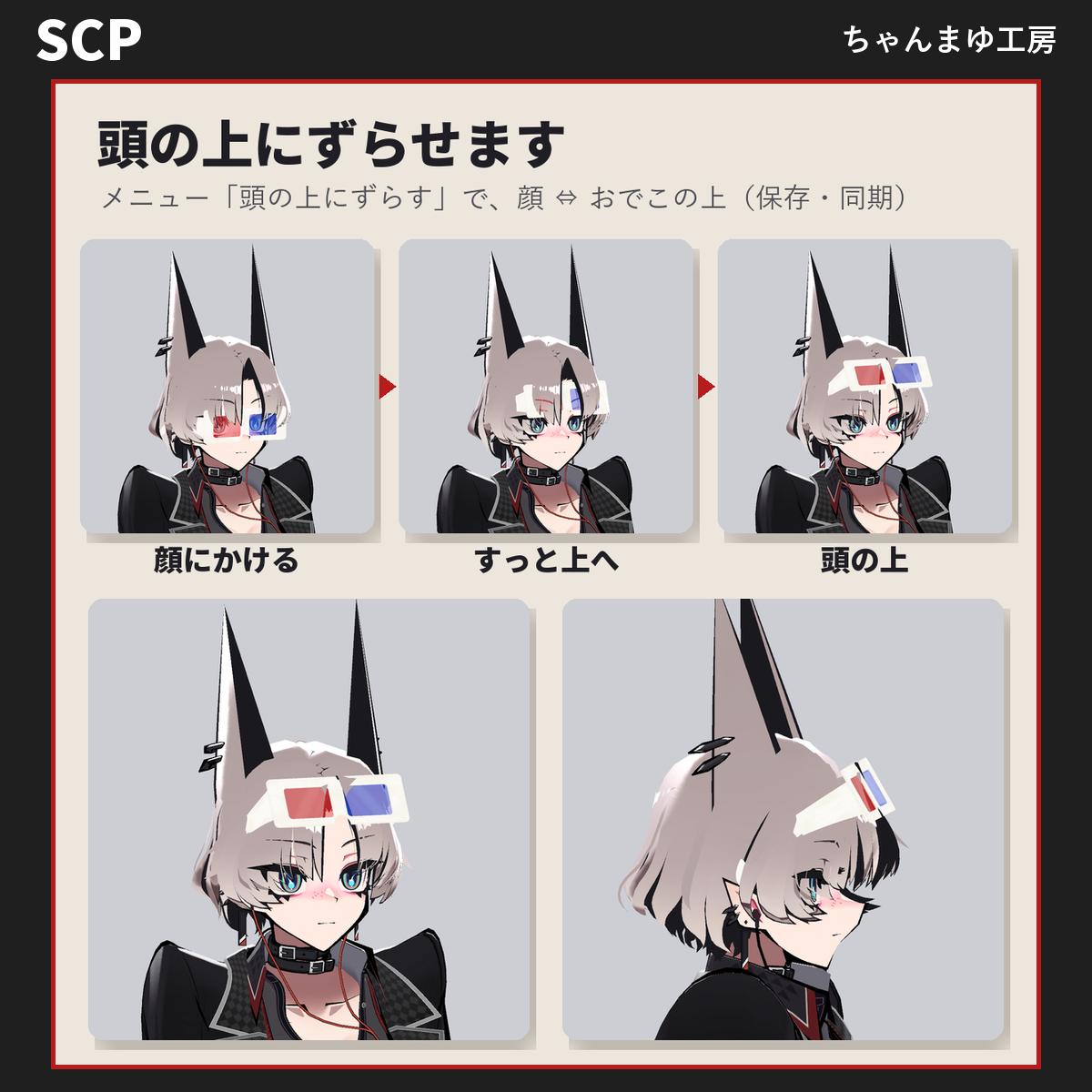
- "Slide up" moves the glasses smoothly between your face and the top of your forehead (saved and synced)
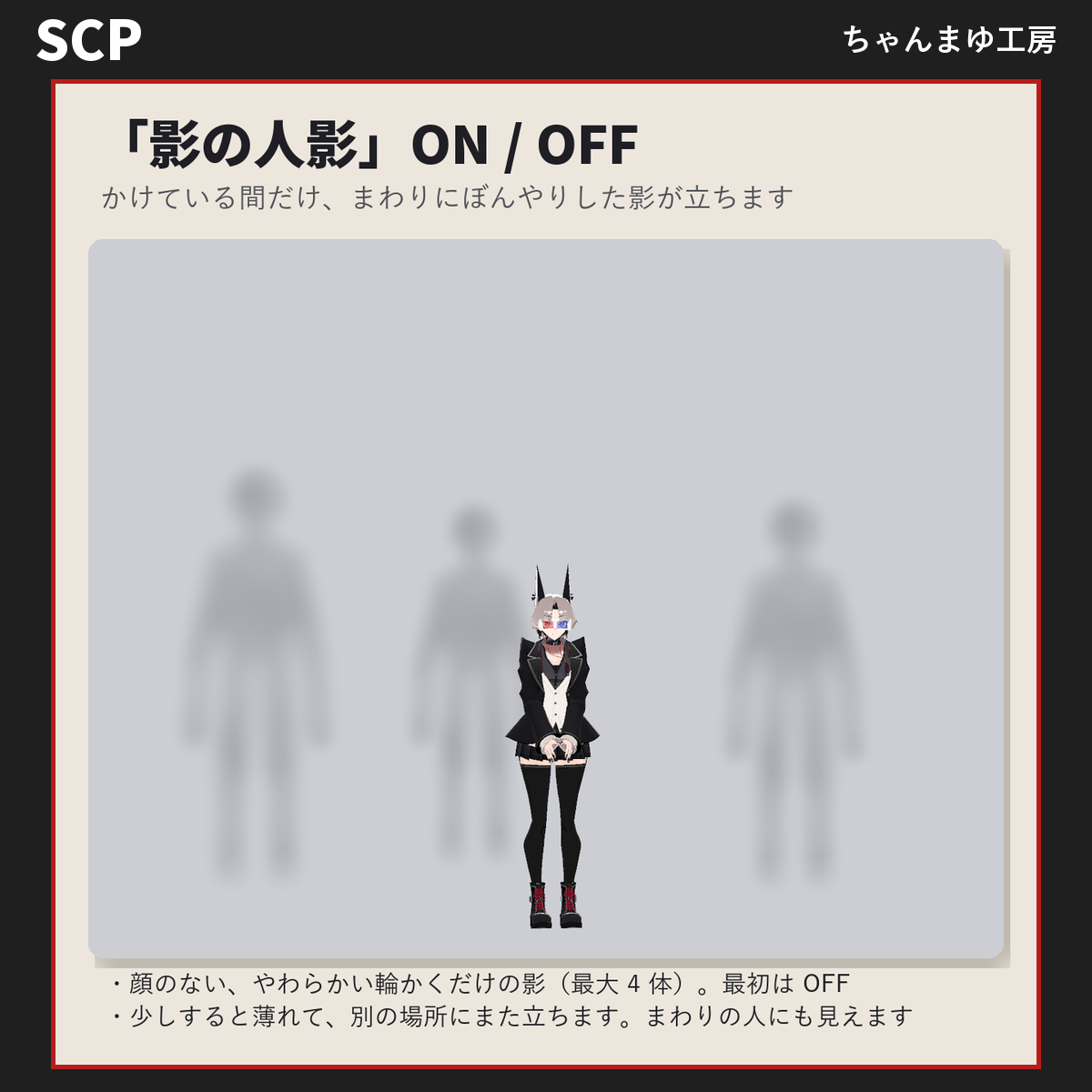
- "Shadow figures": while the glasses are on your face, up to 4 hazy shadow figures stand around you; each fades after a while and another appears somewhere else
- Checked on each of the 21 avatars (default outfit and default hair) at the eyes, in front of the face and on top of the head. Just drop in the prefab from the folder named after your avatar
What's included
ChanmayuKobo_SCP_SCP178_v1.0.0.unitypackage(Unity package)- SCP-178 3-D Specs (about 15.6 cm wide and 5.6 cm tall, with temple arms about 13.5 cm long; the size is scaled to each avatar's eye spacing)
- Shadow figures (1 particle image: a soft, faceless silhouette)
- 22 prefabs: one positioned and sized for each of the 21 avatars, plus one for other Humanoid avatars
- The model, the textures and the shadow image are all original work by Chanmayu Kobo. No scripts are included
README_EN.txt(English install guide and license summary),LICENSE.txt(CC BY-SA 3.0 notice, English and Japanese), and the Japanese README, guide and terms (README_JA.txt,Guide_JA.md,Terms_JA.txt)- No avatar is included.
Expression menu
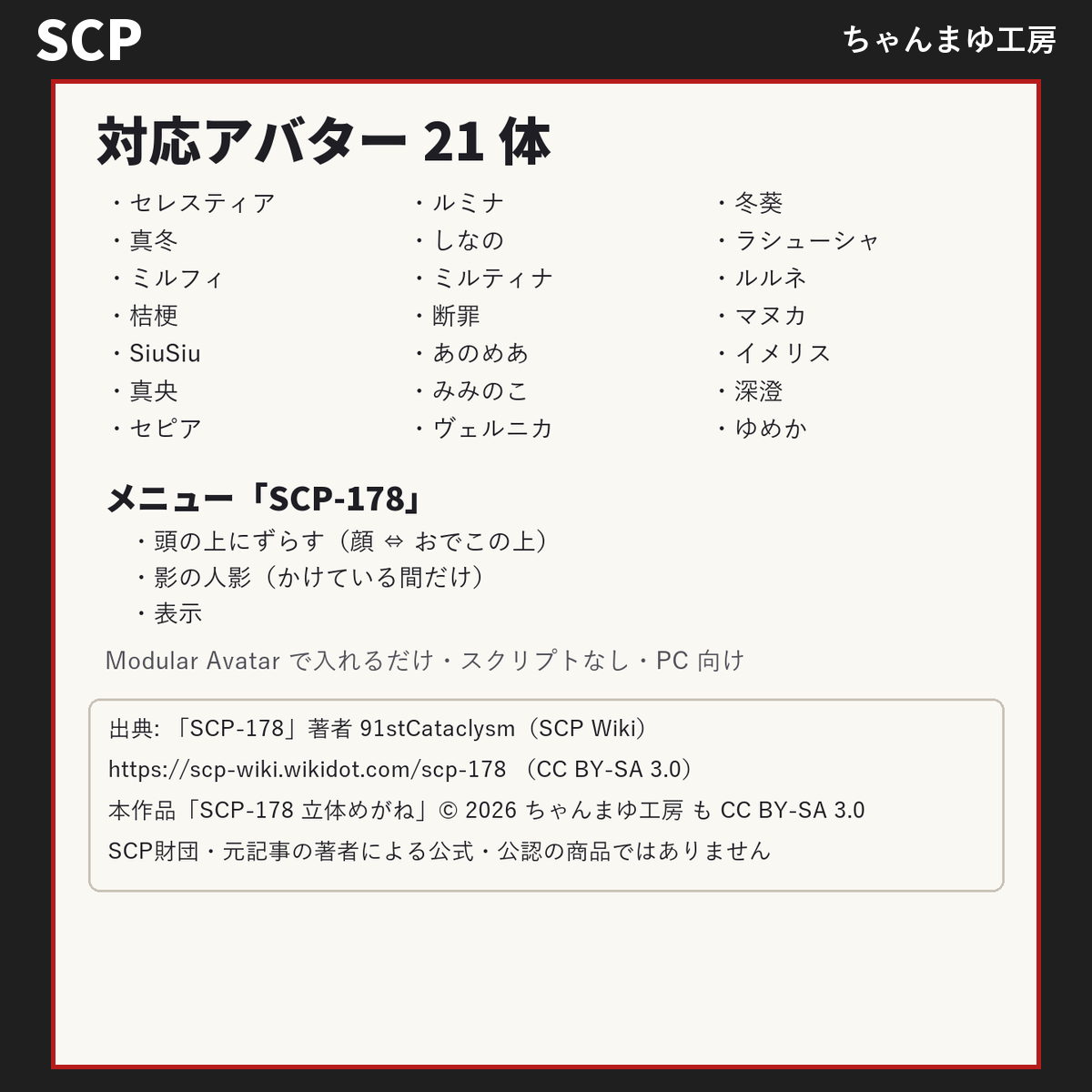
- Everything is in the submenu "SCP-178". The labels are in Japanese (shown in parentheses below)
- Slide up (頭の上にずらす): ON moves the glasses up onto your forehead (top of the head); OFF puts them on your face (saved and synced; starts OFF = on the face)
- Shadow figures (影の人影): ON makes tall, hazy shadow figures stand around you, only while the glasses are on your face (saved and synced; starts OFF; other people can see them too)
- Show (表示): show / hide the glasses (saved and synced; starts ON)
- 3 bits of Expression parameters (3 Bools)
Compatibility
- Requirements: Unity 2022.3 (the version VRChat uses); Modular Avatar (not included; add it with VRChat Creator Companion / ALCOM); lilToon (not included); your avatar (not included)
- Position checked on these 21 avatars (avatars are sold separately on BOOTH):
- Anomea (あのめあ) — https://booth.pm/en/items/5020157
- Danzai (断罪) — https://booth.pm/en/items/3894620
- Fuyuki (冬葵) — https://booth.pm/en/items/4540757
- Imeris (イメリス) — https://booth.pm/en/items/3040745
- Kikyo (桔梗) — https://booth.pm/en/items/3681787
- Lasyusha (ラシューシャ) — https://booth.pm/en/items/4825073
- LUMINA (ルミナ) — https://booth.pm/en/items/7502898
- Mafuyu (真冬) — https://booth.pm/en/items/5007531
- Manuka (マヌカ) — https://booth.pm/en/items/5058077
- mao (真央) — https://booth.pm/en/items/6846646
- Milfy (ミルフィ) — https://booth.pm/en/items/6571299
- Milltina (ミルティナ) — https://booth.pm/en/items/6538026
- Miminoko (みみのこ) — https://booth.pm/en/items/6199796
- Misumi (深澄) — https://booth.pm/en/items/7763002
- rurune (ルルネ) — https://booth.pm/en/items/5957830
- Selestia (セレスティア) — https://booth.pm/en/items/4035411
- sepia (セピア) — https://booth.pm/en/items/3179938
- Shinano (しなの) — https://booth.pm/en/items/6106863
- SiuSiu — https://booth.pm/en/items/8426340
- Velnica (ヴェルニカ) — https://booth.pm/en/items/6302886
- Yumeka (ゆめか) — https://booth.pm/en/items/8672657
How to install
1. Add Modular Avatar and lilToon to your avatar project (VRChat Creator Companion / ALCOM).
2. Import ChanmayuKobo_SCP_SCP178_v1.0.0.unitypackage (Assets → Import Package → Custom Package...).
3. Open Assets/ChanmayuKobo/SCP_SCP178/Prefabs/, open the folder named after your avatar (for example siusiu_SiuSiu), and drag the prefab SCP_SCP178 onto your avatar in the Hierarchy so that it sits directly under the avatar root.
4. Keep the prefab's name SCP_SCP178 as it is (the menu's Show toggle finds its parts by this name).
5. Press Play to check, then upload as usual with the VRChat SDK. Modular Avatar attaches it to the head on Play and on upload.
6. Other Humanoid avatars: use Prefabs/_その他のアバター/SCP_SCP178 and, in the Scene view, move Pos_Face (the position on the face) and Pos_Top (the position on top of the head) to fit. They start at Selestia's positions; the middle of the back of the frame sits on these markers. To change the size, change the Scale of SCP178 inside the prefab.
7. To remove it, delete SCP_SCP178 from your avatar. Nothing in the avatar's own files is changed.
Performance
- 1 mesh (788 triangles)
- 2 materials (cardboard = opaque, lenses = semi-transparent) plus 1 for the shadow particles
- 0 bones, no PhysBones
- 1 Constraint (Parent; switches between the face and the top of the head)
- 1 Particle System (the shadow figures; 4 particles at most, only while "Shadow figures" is ON), no Audio Sources
Good to know
- The lenses are only colored; they do not make anything look three-dimensional.
- With VRChat's defaults, things attached under the head bone are not drawn in your own first-person view, so wearing the glasses does not tint what you see (other people and mirrors show the glasses).
- The glasses sit under the bangs, right in front of the face. On avatars with long bangs, the bangs come in front of the lenses. The temple arms go into the hair and the head.
- The shadow figures are only a visual effect and other people can see them too. They stay where they appeared and fade out in about 6 to 9 seconds (they vanish at once when you turn the effect OFF, slide the glasses up, or hide the glasses).
- If you change the hair or the face and the glasses sink into the face or float, move
Pos_Face/Pos_Topinside the prefab (see the guide). - Tested with Unity 2022.3, VRChat SDK 3.10.5 / 3.10.1, Modular Avatar and lilToon.
- PC only (not for Quest).
- The product images after the first are in Japanese; this page and
README_EN.txtcover installation, the menu and the license in English. - AI-Assisted: the Blender/Python scripts that build the 3D model, textures, animations and sounds, and this English text, were written with an AI coding assistant under Chanmayu Kobo's direction. No generative-AI image, 3D-model or audio tool was used.
Japanese store: BOOTH
https://mayuyu.booth.pm/items/9191006
Follow Chanmayu Kobo on Jinxxy for new accessories and tattoos.